




New
Out-of-Stock


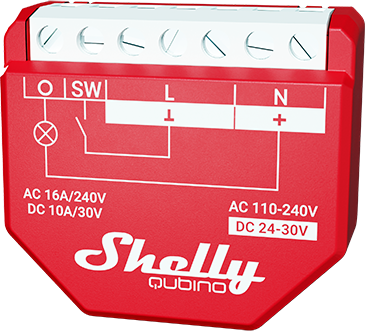
Device: Wave 1PM
EU Part number/Ordering Code: QNSW-001P16EU
AU Part number/Ordering Code: QNSW-001P16AU
USA Part number/Ordering Code: QNSW-001P16US
Z-Wave Product type ID: 0x0002
Z-Wave Product ID: 0x0084
Z-Wave Manufacturer: Shelly Europe Ltd.
Z-Wave Manufacturer ID: 0x0460
Device - In this document, the term “Device” is used to refer to the Shelly Qubino device that is a subject of this guide.
Gateway - A Z-Wave® gateway, also referred to as a Z-Wave® controller, Z-Wave® main controller, Z-Wave® primary controller, or Z-Wave® hub, etc., is a device that serves as a central hub for a Z-Wave® smart home network. The term “gateway” is used in this document.
S button - The Z-Wave® Service button, located on Z-Wave® devices and is used for various functions such as adding (inclusion), removing (exclusion), and resetting the device to its factory default settings. The term "S button" is used in this document.
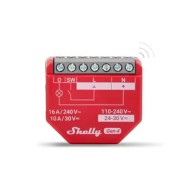
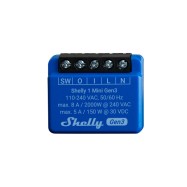
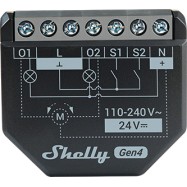
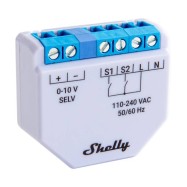
The Device is a single product that enables the control of the on/off function for one electrical device such as bulb, ceiling fan, IR heater. It measures power consumption of the connected device. The Device is compatible with switches (default) and push-buttons.
Switch connected to input terminal SW (SW1)
If the SW (SW1) is configured as a switch (default), each toggle of the switch will change the output state O (O1) to the opposite state - ON, OFF, ON, etc.
Change switch position once: Change the state of the output state O (O1) to the opposite one and send command to the associated devices in associated groups 2 and 3 (check chapter Z-Wave Association)
Change switch position twice: If the delay between first in second click is less then 500ms, this is interpreted as Change switch possition twice. Send command to the associated devices (dimmers, shutters,….) in associated groups 2 and 3 (check chapter Z-Wave Association)
Residential
MDU (Multi Dwelling Units - apartments, condominiums, hotels, etc.)
Light commercial (small office buildings, small retail/restaurant/gas station, etc.)
Government/municipal
University/college
Shelly Qubino Wave devices are developed on the world's leading technology for smart homes – Z-Wave.
This means Shelly Qubino Wave works with all certified gateways supporting Z-Wave communication protocol.
To make sure the functions of Shelly Qubino Wave products are supported on your gateway, we are regularly executing compatibility tests of our devices with different Z-Wave gateways.
Inputs
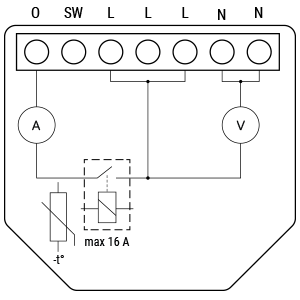
1 switch/button input on screw terminal
5 power supply inputs on screw terminals: 2 N (+) and 3 L (Ʇ)
Outputs
1 relay output with power measurement on screw terminal
Z-Wave - Unsecure, S0 Security, S2 Unauthenticated Security, S2 Authenticated Security
Overheat protection
switch off its own relay
sends the Notification Report to the Gateway (Overheat detected)
the led lights react as specified above (check blinking mode for Overheat detected)
Any of next activities reset this alarm: power cycle, short press on S button, press any switch-push button connected to any SW (SW, SW1, SW2, …) terminal.
NOTE: The Overheat protection is always active and cannot be disabled.
Additional description above under chapter Notification for Overheat detected.
Over-current Protection
Device has internal Over-current protection. If the current exceeds 16A+10% (Max switching current +10%) for more than 5s, the Device will:
switch off its own relay
sends the Notification Report to the Gateway (Over-current detected)
the led lights react as specified above (check blinking mode for Over-current detected)
Any of next activities reset this alarm: power cycle, short press on S button, press any switch-push button connected to any SW (SW, SW1, SW2, …) terminal.
NOTE: The Over-current protection is always active and cannot be disabled.
Additional description above under chapter Notification for Over-current detected.
Resistive (incandescent bulbs, heating devices)
Capacitive (capacitor banks, electronic equipment, motor start capacitors)
Inductive with RC Snubber (LED light drivers, transformers, fans, refrigerators, air-conditioners)
S button and operating modes
Normal mode
Setting in progress mode
Setting mode (with S button)
Settings mode is required to start desired procedure for example: adding (inclusion), removing (exclusion), factory reset etc. It has a limited time of operation. After the procedure in Setting mode is concluded, the Device goes automatically into Normal mode.
Entering to Setting mode:
Quickly press and hold the S button on the Device until the LED turns solid blue
An additional quick press on the S button means menu change in infinite loop
Menu LED status has a timeout of 10s before entering again into Normal state
S button’s functions
Manually adding the Device to a Z-Wave network
Manually removing the Device from a Z-Wave network
Factory Reset the Device
|
Power supply |
110-240 V AC / 24–30 V DC |
|
Power consumption |
< 0.3 W |
|
Power measurement (W) |
Yes |
|
Max. switching voltage AC |
240 V |
|
Max. switching current AC |
16 A |
|
Max. switching voltage DC |
30 V |
|
Max. switching current DC |
10 A |
|
Overheating protection |
Yes |
|
Overload protection |
Yes |
|
Distance |
Up to 40 m indoors (131 ft.) (depends on local condition) |
|
Z-Wave® repeater |
Yes |
|
CPU |
Z-Wave® S800 |
|
Z-Wave® frequency bands |
868,4 MHz |
|
Maximum radio frequency power transmitted in frequency band(s) |
< 25 mW |
|
Size (H x W x D) |
37x42x16 ±0.5 mm / 1.46x1.65x0.63 ±0.02 in |
|
Weight |
27 g / 0.95 oz. |
|
Mounting |
Wall console |
|
Screw terminals max. torque |
0.4 Nm / 3.5 lbin |
|
Conductor cross section |
0.5 to 1.5 mm² / 20 to 16 AWG |
|
Conductor stripped length |
5 to 6 mm / 0.20 to 0.24 in |
|
Shell material |
Plastic |
|
Colour |
Red |
|
Ambient temperature |
-20°C to 40°C / -5°F to 105°F |
|
Humidity |
30% to 70% RH |
|
Max. altitude |
2000 m / 6562 ft. |
|
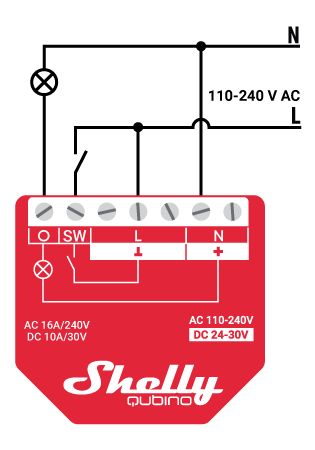
Opens image in full screenOpen AC power supply
|
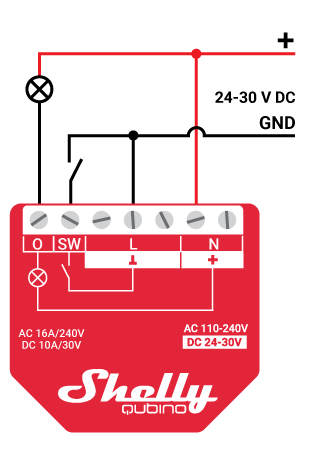
Opens image in full screenOpen 24 - 30 VDC power supply
|
Legend
|
Terminals |
|
Wires |
|
|---|---|---|---|
|
N |
Neutral terminal |
N |
Neutral wire |
|
L |
Live terminal (110–240 V AC) |
L |
Live (110 - 240 VAC) wire |
|
SW |
Switch/push-button input terminal (controlling O) |
+ |
24 - 30 V DC positive wire |
|
O |
Load circuit output terminal |
GND |
24 - 30 V DC ground wire |
|
+ |
24 - 30 V DC positive terminal |
|
|
|
Ʇ |
24 - 30 V DC ground terminal |
|
|
Z-Wave® wireless communication may not always be 100% reliable. This Device should not be used in situations in which life and/or valuables are solely dependent on its functioning. If the Device is not recognized by your gateway or appears incorrectly, you may need to change the Device type manually and ensure that your gateway supports Z-Wave Plus™ multi-level devices.
For troubleshooting please visit our support portal: Support
|
Wave 1PM |
functions - reports |
||||
|
Gateway |
On/Off |
SW On/Off |
W |
kWh |
Notes |
|
Home Assistant |
|
|
|
|
|
|
Fibaro HC 3 / Z-Wave engine 3 |
|
|
|
|
|
|
Homey |
|
|
|
|
|
|
Homee Cube Gen 7 |
|
|
|
|
|
|
Homee Cube Gen 5 |
|
|
|
|
|
|
SmartThings |
|
|
|
|
|
|
Jeedom |
|
|
|
|
|
|
Hubitat |
|
|
|
N/T |
|
|
Notes |
|
||||
|
Legend |
||||
|
Symbol |
State |
|||
|
|
Working / Possible |
|||
|
❌ |
Not Working / Not Possible |
|||
|
P |
Partially |
|||
|
N/T |
Not Tested |
|||
|
TBD |
To be done |
|||
|
Function |
Meaning |
|---|---|
|
On/Off |
tested if device respond to the app UI On/Off command |
|
SW On/Off |
tested if device reports On/Off changes by SW input |
|
Watts |
tested if Watts are reported (unsolicited) |
|
kWh |
tested if kWh are reported (unsolicited) |
|
Up/Down |
tested if device respond to the app UI Up/Down command |
|
SW Up/Down |
tested if device reports Up/Down changes by SW input |
|
Slats |
tested if the slats respond to the app UI command |
|
SW Slats |
tested if the slats report the changes done by SW |
You may find useful guides on gateways in the Z-Wave Shelly Knowledge base.
Wave 1PM multilingual EU declaration of conformity.pdf
Wave 1PM UK PSTI ACT Statement of compliance.pdf